Saturday, 11 October 2025

Paste It 9.0 - Improved Multi-Line Paste and Popup fix

Paste It has been updated to version 9.0, which includes two notable fixes. Existing installations will be updated automatically, or you can install it for free from the Chrome Web Store.

Improve Multi-Line Paste

Paste It has supported multi-line text snippets since it's initial version, but some websites which use rich text formatting would drop the line breaks and condense each line into a single line of text. This has been most commonly reported in email editors such as Gmail, where is is common to use Paste It to insert multi-line text blocks such as an email signature.

With version 9.0, support for multi-line has been improved and sites such as Gmail will maintain line breaks on paste.

Fix for Pop-Up HTML Rendering

Another common use case for Paste It is storing coding snippets, such as frequently used HTML blocks which can be pasted in online IDEs. An unexpected behavior could occur where this code would get rendered in the toolbar popup, showing the formatted text instead of the text content itself.

With the latest update, the popup will always match exactly what was entered in the Options page, rendering HTML as plain text.

14/10/25 - Paste It 9.0.1

Minor fix to revert to a change in Paste in 9.0 that prevented a small number of websites from detecting paste events.

Tuesday, 7 January 2025

Paste It & Papercuts 8.0 - Improved Website Compatibility

Paste It has been updated to version 8.0, a small but significant update that resolves longstanding issues when pasting in sites which use "contentEditable" input for rich text editing, such as Gmail, Reddit and many more. This release also fixes issues pasting on ChatGPT, which recently started using the "contentEditable" input type despite not appearing to use rich text.

When using rich text formatting such as Bold, Italic or table layouts, Paste It will do a pretty good job of retaining the same formatting as the text surrounding the cursor, and keep the focus in the same place. That being said, these websites often incorporate their own formatting logic, so there is a chance that Paste It may occasionally behave in unexpected ways. I'm hopeful this update will resolve the vast majority of compatibility issues that have been raised over the years and will continue to test and optimize the behavior to address any edge cases that crop up.

If you're using my other extension Papercuts for pasting text, rest assured that these fixes also will be coming within the next couple of weeks.

17/01/25 - Paste It 8.0.1

This patch resolve an issue pasting in sites which use the Lexical editor, such as Reddit or WhatsApp, when the text area is empty.

28/01/25 - Papercuts 8.0.0

Papercuts has now been updated to version 8.0 with the same improvements for pasting in rich text editors. Existing installations will be automatically updated within a few days

Thursday, 21 November 2024

Papercuts 7.0 - UX Polish & Enhancements

Papercuts has been updated to version 7.0 with a polished UX that includes a number of small enhancements and fixes to improve the overall experience. Here's everything that's new:

  • The UX of notes has been cleaned up to reduce visual noise and improve consistency. The maximum size of the Popup is also slightly taller, allowing more content in view before scrolling.
  • Increased the maximum number of assignable keyboard shortcuts from 15 to 20.

  • Added a lighter grey (#EEEEEE) Background Color option.

  • The Notebook, Options and Help pages are approximately 15% wider.

  • Buttons on the Options page are larger with more padding.

  • The Enter key can now be used to add a note when the Add a Note button is focused.

  • The Enter key can now be used to rename a tab when the tab name input field is focused.
  • Fixed a UX issue where an additional scrollbar would momentarily be displayed whilst hiding or showing notes.

  • Fixed an issue where hover states would not display if "Display Tooltips on rollovers" was disabled.

  • Animations now use native CSS transitions instead of jQuery, resulting in a smaller bundle size overall (79kb, down from 86kb).

Papercuts can be installed from the Chrome Web Store. Existing installations will be automatically updated within a few days

As always, Papercuts is completely free, contains no ads, tracking or paywalled features, and does not have external access to your notes.

Tuesday, 2 July 2024

Paste It 7.0 - Paste Alt Text from Toolbar Popup & New Icon

I'm pleased to announce the release of Paste It 7.0, a major update which brings new features and improvements in an even tinier package. Here's everything that's new: 

  • The most requested Paste It feature has been the ability to paste multiple items from the toolbar, and with the new version this behaviour is finally supported. Clicking the toolbar will now show a popup allowing you to paste  either the primary text or any of the 15 alternate text snippets:


    The popup support is fully accessible with support for mouse and keyboard control, plus you can hold down CTRL (⌘ on Mac) to copy text to the clipboard instead of pasting it immediately.

    If you prefer the original behaviour of pasting the primary Paste Text immediately on click, the popup can be turned off in the extension options by unchecking "Show Alternate Paste Text in toolbar popup".

  • "Show Alternate Paste Text in context menu flyout" is now the default option to align with the new toolbar behaviour. This can be turned off in the extension options to only show the primary text in the context menu.

  • Paste It has a new icon for the first time in 14 years. The blue star was added to help differentiate from other extensions and the default paste behaviour of the OS.

  • Tidied up the UX of the Options page, with larger buttons, checkbox headers and cleaner transitions.

  • Fixed a race condition where paste text could get cleared if the Options page was reloaded during the loading state.

  • The options page has been updated to use native JavaScript instead of jQuery. By removing the jQuery library, the entire extension is now only 25kb - more than 50% smaller than the previous version.

Paste It can be installed to any Chromium-based browser such as Chrome, Brave or Arc from the Chrome Web Store, or from Edge Add-ons for Microsoft Edge. The extension is always 100% free with no ads or tracking.

12/07/24 - Update 7.0.1

This patch update resolves an issue that was preventing Paste It from interacting with ChatGPT.com and a small number of other websites.

28/07/24 - Update 7.0.2

Addresses a regression in 7.0.1 whereby focus events would not be received on a small number of websites, preventing form validation in some cases.

Sunday, 17 September 2023

Papercuts 6.0 - Paste in Page

 Papercuts has been updated to version 6.0, which includes new features and improvements:

  • "Paste in Page" - Hold the CTRL key (⌘ on Mac) with the popup open to paste notes inside form fields. This new feature works with most secure (https) websites:


  • UX enhancements including a new set of SVG icons which look crisper on high-resolution displays.

  • Support for selecting tabs using the keyboard (tab + enter keys).

  • Export Notes now includes the tab name of each note.

  • Resolved an issue where certain websites would clear pasted notes after focusing out of the input field.

  • Resolved an issue where the enabled/disabled state would display incorrectly in the Notebook.

  • Corrected the ordering of shortcuts on the browser's Keyboard Shortcuts page.

  • Updated jQuery to version 3.7.1.

  •  Installed package is now only 86kb, 33% smaller than the previous version.

Papercuts can be installed to most Chromium-based browsers such as Chrome or Brave from the Chrome Web Store. Please note that Papercuts is not compatible with Microsoft Edge due to differences in the way Edge handles bookmarks.

Existing installations will be automatically updated within a few days, some keyboard shortcuts may need to be reassigned due to a change in the internal IDs used.

As always, Papercuts is completely free, contains no ads, tracking or paywalled features, and does not have external access to your notes.

Monday, 21 August 2023

Paste It 6.0 - 16 Shortcuts

Paste It has been updated to version 6.0, which brings support for more shortcuts and UX enhancements:

  • Increased number of alternate paste text shortcuts from 5 to 15, for a total of 16 shortcuts with the primary paste text.

  • Updated Options UX to better support the higher number of shortcuts.

  • Options now links directly to the browser's Keyboard Shortcuts page for convenience.

  • Removed link to share on Twitter.

  • Updated jQuery to version 3.7.0.

Paste It can be installed to any Chromium-based browser such as Chrome or Brave from the Chrome Web Store, or from Edge Add-ons for Microsoft Edge. The extension is always 100% free with no ads or tracking.

Existing installations will be automatically updated within a few days, Alternate Text keyboard shortcuts may need to be reassigned due to a change in the internal IDs used.

Version 6.0.1

  • Focus the primary text field when opening the Options.

Version 6.0.2

  • Resolved an issue where certain websites would occasionally clear the pasted text after focusing out of the input field.

Wednesday, 25 January 2023

Papercuts 5.0 - Manifest v3, Search & more

Papercuts has been rebuilt to support Chrome Manifest v3, using service workers and new promise-based APIs. This ensures continued support for Papercuts when Google eventually deprecates support for Manifest v2 extensions.

Additionally, the new version of Papercuts includes many new features and enhancements, making it the largest update in over a decade. Here's a summary of everything that's new:

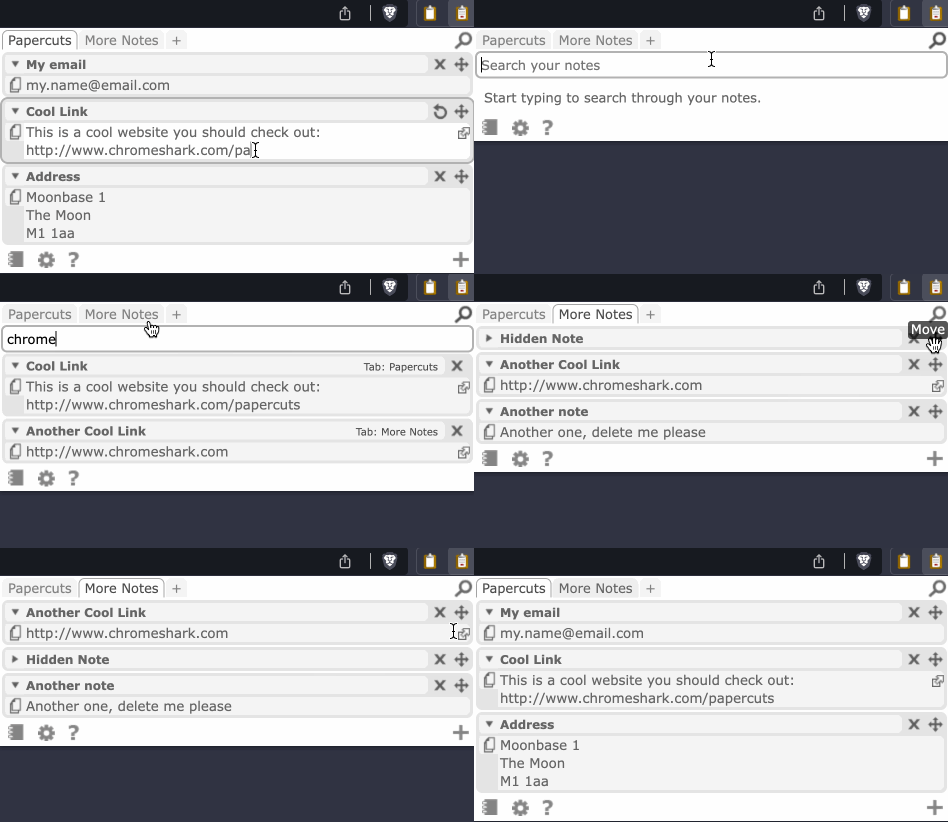
  • New search feature to instantly find text across all of your notes, with a reminder of which tab it was added to.


  • Increased the total assignable shortcut keys from 4 to 15.

  • Refreshed UX on the Popup and Options page with cleaner theming colours.

  • Fix to keep the cursor focus in the same place when pasting in the middle of an input field.

  • Fix the auto-sizing behaviour of multiline notes.

  • Fix for Copy to Clipboard behaviour on sites which do not support paste.

  • Improved the behaviour of Drag & Drop to re-order notes.

  • Browser-specific copy in Options when using the Brave browser.

  • jQuery update to 3.6.3 and other performance enhancements.

Papercuts can be installed in Chrome or Brave from the Chrome Web Store. Please note that Papercuts is not compatible with Microsoft Edge due to differences in the way it handles bookmarks - my other extension Paste It is available for Edge and includes much of the same functionality.

As always, Papercuts is completely free, contains no ads, tracking or paywalled features, and does not have access to your notes.

Wednesday, 11 January 2023

Paste It 5.0.2 - Copy to Clipboard Fix

Paste It has been updated to version 5.0.2, which brings a behavioural change when pasting text in an input field which does not allow pasting. Previously Paste It would show a prompt asking if it should copy to the clipboard instead - now it will add the text to the clipboard without prompting.

This change was required to fix an issue that was introduced in Chrome 107 due to a new policy that blocks clipboard access unless initiated from a user gesture, see this bug report for further details about the issue.

New Behaviour

Old Behaviour with Error


Paste It can be installed for free from the Chrome Web Store or Edge Add-ons.

Saturday, 12 March 2022

Paste It 5.0

Version 5.0.1

  • Remove the request for notifications permission when updating to Paste It 5.0. The Options page has been updated to use standard window alerts on paste which does not require special permission.


Version 5.0.0

I'm pleased to announce Paste It version 5.0, the biggest update since I launched the Chrome extension 11 years ago. Here's everything that's new:

  • Paste It has been rebuilt to support extension Manifest V3, using service workers and the new promise-based APIs. This ensures continued support for Paste It when Google deprecates support for Manifest 2.0 extensions in 2023.

  • Increased Alternate Paste text fields from 3 to 5, for a maximum of 6 text fields with the primary text.

  • New option to "Show Alternate Paste Text in context menu flyout", supporting all 5 Alternate Paste text fields in addition to the primary text.

  • Fix to keep the cursor focus in the same place when pasting in the middle of an input field.

  • Updated UI on the Options page with improved accessibility to assist Screen Readers.

  •  The Brave Browser now links to "brave://extensions/shortcuts" on the Options page. Brave users can install Paste it from the Chrome Web Store and syncing will be supported via the Brave Sync Chain.

  • Updated jQuery to 3.6.0 and performance enhancements.

Paste It 5.0 can be installed for free from the Chrome Web Store or Edge Add-ons.

The Chrome version of Paste It recently reached 20,000 users with daily installs higher than ever, while the Edge version continues to grow with over 1000 users so far. I hope you enjoy the latest update, and remain committed to providing Paste It as a free extension with no ads, tracking or paywalled features. Reviews and feedback are always welcome.


Saturday, 9 May 2020

Phillips PicoPix Max Projector Review


As I was travelling over the past year I was looking to pick up a small projector that would be easy enough to carry for a great movie viewing experience on the go. When I saw the Phillips PicoPix Max on Indiegogo it looked like the perfect fit, with full 1080p projection in a small size and in-built Android.

After a 2-month delay receiving the unit, I've now been using it for 5 months on a semi-regular basis. Phillips have shipped several software updates in this time, most recently the first major update (version 1.1). This felt like a good time to post some initial thoughts.

I'm viewing on a white 100" projector screen.

Positive Thoughts

  • Build quality feels premium and although far from 'pocket-friendly' as advertised, it's small enough to fit in a bag. At 850g it's not much heavier than a large tablet.
  • Picture quality is good even at 100" - the image looks crisp without any visible artefacts. Many '1080p' projectors on the market are actually upscaling from 720p - the PicoPix Max uses native 1080p and the difference is significant at this size.

  • Brightness is impressive at normal mode, and great for night-time viewing. My flat is bright in daylight it's difficult to view before sunset - an increasing problem as the days have gotten longer.
  • When I first got the projector the fan noise was too loud unless I dropped down to the dim eco-friendly mode, but this was addressed in the recent 1.1 patch. Now normal mode is suitably quiet for viewing and eco mode is silent.


Issues

  • It's advertised as an Android projector, but this is unlike any Android device I've owned. Largely this is due to there being no Google Play services, so you won't find a Play Store or any Google apps like Chrome or Play Movies. YouTube requires use of a 3rd party app for authentication, which I didn't feel confident to put my Google creditendials into.
  • App selection is poor, the in-built 'Aptoide Store' lists many apps that simply don't work, giving errors such as 'Play Services Required'. When I bought the projector I'd hoped to watch The Mandalorian on it, but Disney+ wasn't there. More recently I tried to watch Westworld season 3, but I couldn't get HBO. After trying many apps in Aptoide I've given up unless they are pre-installed, which limits you to Netflix and only a small handful of others.
  • The cast support on the device is basic screen share and the device has no ChromeCast support. This is a real shame as it would have been one way of circumventing some of the issues mentioned above, but most apps can't be casted from my Android phone. Other non-Android devices have "ChromeCast Built-In", so I really hope this get's added in a software update.
  • I ended up purchasing a ChromeCast dongle to stick in the back HDMI port, but sadly this surfaced another batch of problems. Bluetooth Audio is only supported though the on-board software, so it's impossible to use with dongles like the ChromeCast - I've had to start using an old-school 3.5mm headphone cable to connect to my bluetooth speaker.
  • As most display features are handled at the software layer, over HDMI you don't get many of the advertised features like 4-Corner Keystone correction. As a result I have to awkwardly position my screen at an angle to get a correctly aligned picture.
  • This is more of a nuisance but other software features are missing over HDMI, for example you can't see the current battery level without switching the Input mode back to Android.

Verdict

The PicoPix Max feels is a nice piece of hardware with over-engineered software that fails to meet some of my basic expectations from a projector. Without Play Services, Android feels like a bad fit for this sort of device and I think Phillips would have been better off focusing on the fundamentals like full feature support over HDMI.

As most of the issues are software-based, it's not impossible to imagine them being addressed with updates before this device hits retail. Receiving Google Play Services might be a stretch, but ChromeCast Built-In would be a great start and give users a way of accessing apps that aren't supported.

The PicoPix Max is an intriguing device that offers a glimpse to the future of portable projectors, but I couldn't recommend it in it's current form.

Sunday, 19 April 2020

Papercuts 4.0


As well as updating Paste It to version 4.0, this week I will be releasing Papercuts 4.0, the first major update in over 4 years. Here's what's new:

Custom Keyboard Shortcuts

Papercuts 4.0 will allow the keyboard shortcuts to be customised from chrome://extensions/shortcuts. To set keyboard shortcuts, head to the Notebook tab of the Options page and select a shortcut next to the note you wish to assign. If you see "Shortcut X" instead of a key code, you'll first need to go to the chrome://extensions/shortcuts page to set a key.

Due to a restriction in Chrome, the keyboard shortcuts are now limited to 4 notes (previously this was 9). If you require more shortcuts, consider installing Paste It as well, so you can effectively have up to 8 keys assigned in total.

Workaround for Unsupported Input Fields (e.g. Gmail)

As detailed on my previous post, Papercuts 4.0 offers a workaround for pasting on unsupported input fields, such as Gmail or Reddit, instead of silently failing.

Friendlier Permissions and Bug Fixes

When you install Papercuts for the first time you will no longer see a message about the extension reading the data on "all your data on the websites you visit". This was previously only used for the legacy keyboard shortcut method, which now uses a safe and supported Chrome API.

Papercuts 4.0 also contains a number of bug fixes, including some UI issues which caused a second scrollbar to display and the 'Rename Tab' button to be hidden off screen. Both the popup and options pages have received a bit of polish and clean up.

Papercuts can be installed for free from the Chrome Web Store, with the version 4.0 update coming within a few days pending approval from Google. I'm not planning on bringing Papercuts to the Edge Add-ons store, but the Chrome version can be installed on Edge.

Papercuts is both offered 100% free with no ads or paywalled features. Please show your support by leaving a review in the Chrome Web Store or sharing it with your friends.

Paste It 4.0

This week I will be releasing version 4.0 updates to both of my browser extensions, Paste It and Papercuts. Each features a number of new features that I hope you find useful, including a long-awaited workaround for sites like Gmail.

First off, here are the changes you'll find in Paste It 4.0, which offers further enhancements to the recently released 3.6 update.

Workaround for Unsupported Input Fields (e.g. Gmail)

One of the most commonly reported issues for both Paste It and Papercuts is that pasting was unsupported on some websites, particularly those that use rich text editing such as Gmail or Reddit. This has proven difficult to fix as it would require a deep understanding of how these sites operate, and their implementations could potentially change over time.

With the version 4.0 updates, I have implemented a workaround which will intelligently detect when the text does not paste successfully, in which case an option will appear to allow you to copy the text to the clipboard instead. From there you can paste your text using regular system commands such as Ctrl+V or the context menu.

Paste Text for 4 Different Keyboard Shortcuts

Another popularly requested feature for Paste It has been the ability to support more lines of text. With the new update, Paste It will support up to  3 alternate paste texts in addition to the primary text, which you can set from the "Alternate Paste Text" section of the Options page. By default these use Alt+Shift+V, Alt+B and Alt+Shift+B, all of which can be customized from chrome://extensions/shortcuts.

Note that Alternate Text can only be pasted from keyboard shortcuts - Chromium has a hard limit of one toolbar icon and one context menu entry per extension, so these methods will only support the primary text string. Some people have suggested  using a dropdown menu to allow these to be expanded, but I believe that would detract from the speed and simplicity of Paste It. I recommend looking to Papercuts if you wish to store and paste multiple notes.

Dyamic Keyboard Shortcuts and Better Mac Support

Paste It 4.0 also improves the recently added custom shortcut feature so that the Options page will now show the correct keyboard shortcut if you customise it. Additionally, on MacOS this will now display as "⌥+V" by default.

Paste It can be installed for free from the Chrome Web Store or Edge Add-ons store. The version 4.0 update will be available within a few days, pending approval from Google and Microsoft.

Paste It is offered 100% free with no ads or paywalled features. Please show your support by leaving a review in the Chrome Web StoreEdge Add-ons store or sharing it with your friends.

Friday, 3 April 2020

Paste It 3.6

Paste It is a browser extension I started work on in 2010 ago as lightweight alternative to my note keeping extension Papercuts, with the primary aim of being able to paste a single line of text - typically the user's email address - in the quickest and simplest way possible.

Over the past decade Paste It has found over 10,000 users on Chrome worldwide. This week I released Paste It 3.6, which brings a number of new features and improved support for Edge.

Friendlier Permissions

If you installed Paste It prior to this week, you may have seen a message that the extension could “read and change all your data on the websites you visit”. While this may have sounded a little scary, it was required so that the extension could add the neccessary code to each website to support keyboard shortcuts i.e. pasting text when the "Alt+V" key was held down.

With version 3.6, I've rewritten how the extension interprets keyboard commands using Chromium's in-built commands API. As this is a standard and safe method supported by Chromium, there won't be any warnings when you first install Paste It.

Customizable Keyboard Shortcuts

Paste It 3.6 also brings a commonly requested new feature - customizable keyboard shortcuts! If you don't want Alt+V to be the keyboard command, just open chrome://extensions/shortcuts to change it to anything you like. This could be useful if you have another app that's using the default command already.

I'm hoping to bring this update to Paste It's bigger brother Papercuts, though that will take a bit more work due to the more complicated nature of the extension supporting multiple keyboard shortcuts.

Other Tweaks

There are a few other tweaks in this version, such as a cleaner Options page with clearer usage instructions. I've improved feedback for some unsupported pages such as the Chrome Web Store or internal browser pages - if you try and use Paste It on these websites you will now get an alert instead of a silent failure.

Some sites such as Gmail will still fail silently - this is due to the complicated nature of their rich text input which has proven difficult to work around.

Improved Edge Support

While it was already possible to install Paste It on the new Chromium-based Microsoft Edge browser, version 3.6 makes a few changes to the terminology used inside Edge to provide a more optimal experience.

Today I'm also pleased to announce that Paste It is now available in the Edge Add-ons section of the Microsoft Store. It works exactly the same as the Chrome Web Store version, but if you are using Edge I'd recommend installing via Microsoft's store to ensure future updates are downloaded automatically.

Paste It and Papercuts are both offered 100% free with no ads or paywalled features. Please show your support by leaving a review in the Chrome Web StoreEdge Add-ons store or sharing them with your friends.

Friday, 10 August 2018

Surface Book Thoughts

It's been two years since I purchased the Microsoft Surface Book, since then they've released a follow-up and various other iterations of the Surface line, but most of my thoughts on the device still remain valid. I agree with the good reviews the device has received, but having used it for this long, I still have feelings that Microsoft haven't quite hit the perfect form factor just yet.

By most standards it's an exceptionally well made device, with a great keyboard, touch-pad and screen. My only criticism is that the bezels are rather large compared to other laptops, another 1/2 inch of screen in the same form would go a long way. Battery life isn't the best, but notably this was improved on the newer model. Despite this being the first generation I find the performance excellent and the clean build of Windows runs smoothly.

I love being able to pop off the screen and use the laptop in different modes - the tablet (fully detached) is great for reading E-Books, presentation is perfect for movies, and studio works well for drawing with the Pen. While I use laptop mode 90% of the time, having these options is a major advantage compared to regular laptops.

The device's killer feature that sets it apart from other hybrid laptops is the detachable GPU, but in my experience this is also the device's biggest flaw. It's because of this that the detachment requires a software release, so you can't detach or replace it without turning the laptop on. Some apps won't let you detach without quitting them, which often affects the versatility of switching modes. It's also due to this that the laptop has it's controversial snake hinge design - while I don't mind the unique look, it makes the laptop bulky and less stable than a normal hinge.

Although it would be technically challenging to build, for me the perfect surface would ditch the GPU base and include a powerful integrated GPU in the tablet. The additional space in the base could cater for additional battery capacity, using clever software based tricks to enable a high-performance mode when attached, then reverting to a more battery-efficient mode when being used as a tablet.

Such a device might sound a lot like a regular Surface Pro with a keyboard cover, but for me that wouldn't meet the need of being a no-compromise laptop which doesn't limit screen size, battery life or port selection. I'd love to see a Surface Book 3 that addresses the flaws I've experienced, or perhaps a new class of device would be the answer.

Sunday, 7 June 2015

Papercuts 3.2

It's been a while since I added new features to my note-keeping Papercuts extension for Chrome, but I've just pushed a new version 3.2 to add Note Exporting from the Options page.

There's a few caveats to be aware of - exporting will save notes in a raw JSON file format so you'll probably want to use a tool such as JSON viewer to read it. None of the metadata needed by Papercuts is saved, so there is no way to re-import notes - this feature may be added at a later date but I have no planned timeline currently.

Something that many users might not realize is that as Papercuts are saved as bookmark data, you can always export your bookmarks from Chrome and re-import them exactly as they were. This is still the recommended way of backing up Papercuts, but I hope the new Export feature proves useful for transferring notes to other services or just as peace of mind that they won't get lost if you lose your Chrome data.

Papercuts 3.2 also contains some polish to the settings/help pages and a jQuery update for potential performance improvements.

Thursday, 1 January 2015

Nexus 6 Review

A couple of years ago I bought a Nexus 7 and one thing was immediately clear - Android is a much better experience on a larger device. Everything from navigating maps to browsing the web is easier, and playing games and videos is comfortable enough to want to do it by choice, not just when there's no alternatives.

The issue I had with the Nexus 7, and any tablet for that matter, is that the hassle of carrying, maintaining and charging a second device negates any benefits of the larger screen. Even 3 years ago, I'd thought that having a big screen in a small enough body to carry around and use as a phone would be the perfect device.

So buying the Nexus 6 was a no-brainer for me, not only increasing the screen size but delivering a pure Android experience in a more premium body than last years Nexus 5. The experience is just as good as using a Nexus 7, the size reduction is made up for by the 2X resolution and incredible front-facing speakers. Playing a game like Broken Sword would have been frustrating on 5" device, but here the experience is just as good as playing it on a full PC 15 years ago.

I'd been disappointed with the plastic, squarish build quality of the Nexus 5, but here Motorola have blown it away on every level. The metal edge makes it feel as solid as any all-metal phone I've tried, while the curved back and screen make it feel great to hold. If I had to nitpick, the bezel is slightly larger on the top than the bottom, giving it a slightly unbalanced feel, but if this was the only compromise to pull off a device that feels this good, then that's acceptable. All in all, Motorola have matched the quality of any other phone I've tried.

As well as running the latest version of Android Lollipop , the Nexus 6 has a couple of device-specific features that are worth mentioning. The first is always-on voice, so OK Google works when the screen is off. It sounds like a minor change, but revolutionizes how voice control works - I find it genuinely convenient to be able to ask questions like "What time is it?" from across the room.

The other new Lollipop feature here is ambient notifications, which lights up the screen when a message comes in or the phone is picked up. Android has needed this for a while, but sadly Google's implementation is nowhere near as useful as others such as Motorola's Active Display, and the motion sensor is hit and miss at best. More annoyingly, this feature comes at the coast of an LED light or Tap to Wake, which I feel would be more useful when combined with an app like Lightflow. I really hope Google fixes this and add in more options in a software update.

Coming from the Nexus 5, my benchmark for good battery life is fairly low, but the Nexus 6 still impresses me a lot, effortlessly managing 2 days without much use. When it's being used for longer times such as playing a game, that 2X screen burns the battery down in few hours, but this is quickly replenished with the amazing Quick Charge functionality that promises 50% of charge in 15 minutes. It's just as good in practice as promised, even getting to 70-80% battery life seems to take no time at all.

Along with a cutting-edge camera, the Nexus 6 leaves me wanting very little. There's room for some software improvements, especially a rethink of the new notifications and phablet-friendly UI tweaks to make the bigger screen more manageable. Overall the Nexus 6 is my favourite Nexus phone to date and easy to recommend if you prefer bigger Android devices.

Tuesday, 26 August 2014

Paste It 3.5

It's been a long while since I updated one of my Chrome Extensions (http://www.chromeshark.com), but somehow my note-pasting extension Paste It received  a large surge of users recently, and given that it's one I use myself on a daily basis, I thought it was time to give it a quick refresh to version 3.5.

The functionality is the same as before - set a piece of text and use the Toolbar icon, Alt+V keyboard shortcut or Context menu to insert it in a text field. It's particularly useful for email addresses, never again suffer the "please confirm your email address" box.

Version 3.5 now let's you toggle any of the options on or off, so if you only want the keyboard shortcut for example, you don't have to fill up your menus. It also uses the new "activeTab" feature of Chrome apps so you it doesn't require as many permissions to install. Install it for free it here.

I get a lot of requests for more advanced features such as multiple notes or customizable keyboard shortcuts. Unless I find really clever ways of implementing these, it's unlikely I'll add such features as my primary aim for Paste It is to keep it very simple to use. All these features and more are possible with my more advanced Papercuts extension.

Tuesday, 12 November 2013

Nexus 5 First Impressions

The Nexus 4 was my favourite phone to date, so it wasn't an easy decision to upgrade to the Nexus 5, but the 1080p screen and addition of 4G was enough to make it worth the relatively small upgrade cost.

Whereas the N4 was a massive design improvement over the Galaxy Nexus, after a week the N5 has left me feeling less impressed. The decision to ditch the overly flashy chrome trim and sparkly back are understandable and help make the phone look and feel more premium, but in other ways I feel that Google went too far. The curved edges of the N4 felt great in-hand, but the N5 replaces these with more mundane square edges which catch when you swipe the screen, not unlike most other smartphones, but still a design characteristic I'll miss. The new buttons are also much sharper on the edges, all in all the design isn't worse than it's predecessor, it's just less friendly - even less Googley.

All these concerns are nearly forgotten when the screen is powered on, because the new 1080p displays looks incredible, as good as the best out there. It may only be a small increase from the N4, but the transparent toolbars and more colorful OS help make it look bigger and brighter than specs alone.

KitKit is generally a much nicer looking OS, with most of the dreary blacks replaces with semi-translucent whites. The new launcher adds more customizability options without making it more complicated, and most of the stock apps have simpler, cleaner UIs. There's a few inconsistencies, the integration of SMS into hangouts is flaky and the Gallery app seems to have been only semi-upgraded to a new Photo app, but it's a step in the right direction and, for now, feels fresh for the first time in a while.

I've been a big advocate of Nexus devices for a long time, their simpler, more consistent UX is worlds away from most other Android phones without sacrificing customization options, but they've always felt like they lack 'something' that more expensive skinned phones do. With KitKit, that something has been mostly fulfilled on the software side and the hardware is closer than ever - maybe next year Google can bring it all together into a perfect package.

Thursday, 7 March 2013

Meteor Blast HTML5 - Game Complete

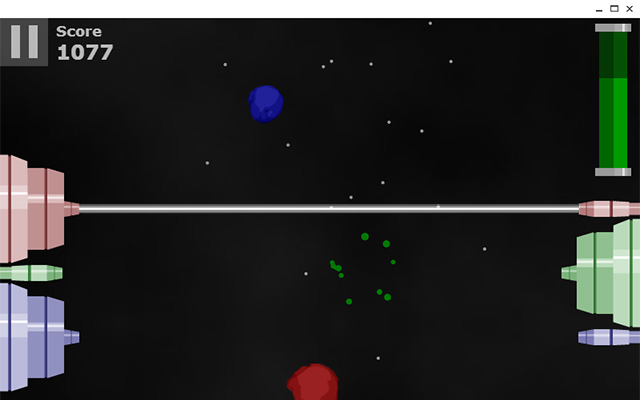
In my last post talked about my HTML5 game Meteor Blast, now I've finished it and released it in both tge Chrome Web Store and Play Store for Android

To start with the good, I'm pretty happy with the Chrome version. It's a new-style packaged app which was easy to create, 99% of the code was unchanged, the only unsupported feature of the web version was localStorage which needed changing to Chrome storage, which took a bit of code restructuring but works in a similar way.

As a packaged app it works offline by default, and launches in a standalone window, which looks more app-like than a hosted app. I developed the game to work with touch so I expect this version works nicely on the Chromebook Pixel, but I haven't had a chance to try it yet.

Less successful was the port to Android via Phonegap. It took a long time to get this working, I hit some resizing bugs that I had to edit the Cordova source code to get around. I managed to get performance on my Nexus 4 reasonable by stripping out some effects but it's far too laggy on most other devices to call it a success. I can't say for sure that I optimized the game as much as possible, but I wouldn't attempt making an Android game with Phonegap again - at least not one that requires a good frame rate to play well.

So my dreams of developing fully cross-platforms with HTML5 have been slightly tarnished, but I'll be interested to look into other solutions for porting across platforms.

Sunday, 3 February 2013

Meteor Blast HTML5

Since starting work with HTML5 several years ago and prototyping several games, I'm now starting work on my full game that I intend to release cross-platform. It'll be called Meteor Blast and is loosely based on my Flash game of the same name, but with a new input mechanism that will work with both touch and keyboard devices.

I'm using the CreateJS library from Adobe in addition to jQuery, which makes coding the game similar to Flash, especially where animation is concerned. The library lacks a class structure so I'm relying on prototypes for OOP, not an ideal solution for a larger project, but so far has been sufficient for this project.


The game's killer 'feature' is that is should work across all platforms - all modern desktop browsers, HTML5 OS's such as Windows 8, Tizen and Firefox OS, as well as Android and other mobile OS's through Phonegap. So far I've found Phonegap to be fairly headache-free, my only worry is how much performance will suffer - I had to make considerable optimizations (and some sacrifices) to get it running smoothly on my Nexus 4, so older devices may cause problems.


I'm fairly happy with how well the game is turning out though, it's feeling more like a 'proper' game than an experiment, and I hope people will enjoy playing it. I still have to add sound, preloading, menus and a difficulty curve so it'll be some time before release, I'll post back soon with updates.