The Nexus 4 was my favourite phone to date, so it wasn't an easy decision to upgrade to the Nexus 5, but the 1080p screen and addition of 4G was enough to make it worth the relatively small upgrade cost.
Whereas the N4 was a massive design improvement over the Galaxy Nexus, after a week the N5 has left me feeling less impressed. The decision to ditch the overly flashy chrome trim and sparkly back are understandable and help make the phone look and feel more premium, but in other ways I feel that Google went too far. The curved edges of the N4 felt great in-hand, but the N5 replaces these with more mundane square edges which catch when you swipe the screen, not unlike most other smartphones, but still a design characteristic I'll miss. The new buttons are also much sharper on the edges, all in all the design isn't worse than it's predecessor, it's just less friendly - even less Googley.
All these concerns are nearly forgotten when the screen is powered on, because the new 1080p displays looks incredible, as good as the best out there. It may only be a small increase from the N4, but the transparent toolbars and more colorful OS help make it look bigger and brighter than specs alone.
KitKit is generally a much nicer looking OS, with most of the dreary blacks replaces with semi-translucent whites. The new launcher adds more customizability options without making it more complicated, and most of the stock apps have simpler, cleaner UIs. There's a few inconsistencies, the integration of SMS into hangouts is flaky and the Gallery app seems to have been only semi-upgraded to a new Photo app, but it's a step in the right direction and, for now, feels fresh for the first time in a while.
I've been a big advocate of Nexus devices for a long time, their simpler, more consistent UX is worlds away from most other Android phones without sacrificing customization options, but they've always felt like they lack 'something' that more expensive skinned phones do. With KitKit, that something has been mostly fulfilled on the software side and the hardware is closer than ever - maybe next year Google can bring it all together into a perfect package.

Tuesday, 12 November 2013

Thursday, 7 March 2013
Meteor Blast HTML5 - Game Complete
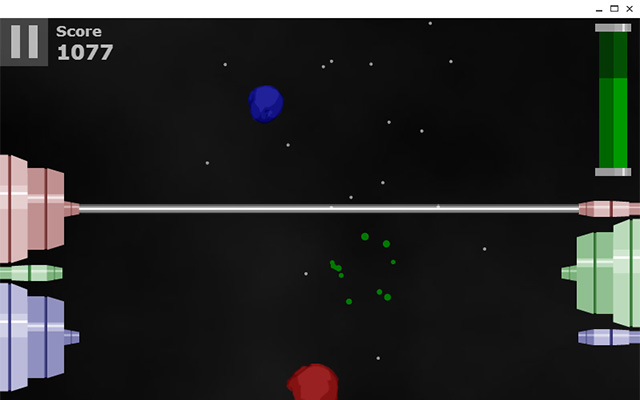
To start with the good, I'm pretty happy with the Chrome version. It's a new-style packaged app which was easy to create, 99% of the code was unchanged, the only unsupported feature of the web version was localStorage which needed changing to Chrome storage, which took a bit of code restructuring but works in a similar way.
As a packaged app it works offline by default, and launches in a standalone window, which looks more app-like than a hosted app. I developed the game to work with touch so I expect this version works nicely on the Chromebook Pixel, but I haven't had a chance to try it yet.
Less successful was the port to Android via Phonegap. It took a long time to get this working, I hit some resizing bugs that I had to edit the Cordova source code to get around. I managed to get performance on my Nexus 4 reasonable by stripping out some effects but it's far too laggy on most other devices to call it a success. I can't say for sure that I optimized the game as much as possible, but I wouldn't attempt making an Android game with Phonegap again - at least not one that requires a good frame rate to play well.
So my dreams of developing fully cross-platforms with HTML5 have been slightly tarnished, but I'll be interested to look into other solutions for porting across platforms.
Sunday, 3 February 2013
Meteor Blast HTML5

I'm using the CreateJS library from Adobe in addition to jQuery, which makes coding the game similar to Flash, especially where animation is concerned. The library lacks a class structure so I'm relying on prototypes for OOP, not an ideal solution for a larger project, but so far has been sufficient for this project.

The game's killer 'feature' is that is should work across all platforms - all modern desktop browsers, HTML5 OS's such as Windows 8, Tizen and Firefox OS, as well as Android and other mobile OS's through Phonegap. So far I've found Phonegap to be fairly headache-free, my only worry is how much performance will suffer - I had to make considerable optimizations (and some sacrifices) to get it running smoothly on my Nexus 4, so older devices may cause problems.
I'm fairly happy with how well the game is turning out though, it's feeling more like a 'proper' game than an experiment, and I hope people will enjoy playing it. I still have to add sound, preloading, menus and a difficulty curve so it'll be some time before release, I'll post back soon with updates.
Sunday, 27 January 2013
Chromebook (late 2012) Review

Samsung's Chromebook design has changed a lot in a short time, from the glossy black toy-like Series 5 to the premium feeling 550, with this model they've gone back to plastic but it still feels like a premium machine, largely due to it's thin, clean profile. I wouldn't feel ashamed getting this out in a cafe full of Macbooks, and much prefer it to the original.
Performance has increased significantly from the original Series 5, previously I'd found Flash and high-performance HTML5 apps out of the question, but now they run smoothly and there's no lag with a few tabs open. I can't think of many scenarios where it wouldn't be enough power to get the job done.
There's a few compromises that come with the lower price, most notably the screen, which is slightly smaller and doesn't seem as clear. It's not inappropriate for a device of this price, but if Samsung could fit a larger, higher-res screen into the same profile, I'd happily pay a bit more. Battery life isn't as insanely long as the original but can still make it through a few hours, much more than an equivalent Windows netbook.
Connection options are more up to date this time round, with HDMI output replacing VGA, and one of the USBs updated to version 3.0. The touchpad feels more responsive and the keyboard is still great, but I'd have liked to see backlit keys added.
Chrome OS itself has come on leaps and bound since I first got the Series 5 Chromebook when it was just a single window of Chrome. Although I had mixed feelings about the Aura window management when it first rolled out, improvements like the Android-esque app launcher have made it feel more like a fully fledged, modern operating system. There's still weak areas - media playback is basic and file management is clunky - these aren't a huge problem on a cloud-based OS, but improvements in these areas could still go some way to improving the overall experience.
The concept of a cloud-based OS has also become more realistic in the past year, largely due to Google's additions to it's own web app suite, such as Play Music, Drive and offline Docs. Offline support in external apps is still poor and some users will still miss certain native apps (for me Spotify is a sore loss, but a web version is rumoured to be in the works). I hope that Chrome's new packaged apps, NaCl and ever improving HTML5 will help fill these gaps.
It's still hard to say if or when Chrome OS will become a true replacement to a traditional OS, but for many people it could already be close enough, and it's a handy secondary laptop if your main machine is too heavy to carry around. In making the new model cheaper and lighter without sacrificing much functionality, Samsung have made a near-perfect piece of hardware for Chrome OS and it's a great time to give it a go.
Monday, 3 December 2012
Samsung Galaxy Camera Review

I've never owned a camera in my life, but with a HD touch screen and Android Jelly Bean the Galaxy Camera looked like a worthy purchase. I usually feel that most cameras look either cheap or old fashioned - but the Galaxy Camera looks great with a mix of aluminium, glossy plastic and chrome. It'd be an understatement to say it matches the style of the Galaxy phones and tablets - I think this is one of the best looking devices Samsung have created.
I won't try to comment too much on the photo quality as I wouldn't know where to start - it's easy to say it's a huge step up from current camera phones, but maybe not so much that phones couldn't catch up in a year or two. That said, the additional hardware benefits of an optical zoom, large flash, shutter button and tripod support will probably not make it to phones any time soon, so I think it's a fairly future-proof device that will get a few years use out of it.
The main selling point of the device is that a mix of HD screen, Jelly Bean and a quad-core processor make it the first camera to be truly capable of installing and smoothly running Android apps. I think the possibilities here are huge but there's a severe lack of useful apps at the moment - most existing camera apps don't support the device's zoom and Samsung's smart camera apps such as remote viewfinder don't seem to work yet. I expect that this will all pick up of over time and it could be an amazing opportunity to develop innovative camera-optimized apps.
A key reason I bought the Galaxy Camera was to use it for streaming Hangouts on Air, so was disappointed that there was no option in the Google+ app to start a Hangout. The helpful G+ page responded on this issue, and I discovered it's possible if you start the hangout on another device and invite the Galaxy Camera in. So while it could be clearer, I think it's incredible that this device can be used to wirelessly broadcast high quality livestreams from effectively anywhere in the world with a 3G or wifi connection.
Assuming app support improves, there's very little I would change about the Galaxy Camera. While it's not cheap compared to other cameras, I think the build quality and uncompromised power of Android make it a very recommendable purchase.
Sunday, 18 November 2012
Android 4.2 First Impressions

The clock app itself has been rebuilt with some strange design choices. For setting the time, you now need to type in the digits instead of scrolling, which makes it impossible to add an extra 10 minutes or so without retyping the whole thing. The alarm also requires dragging to deactivate or snooze, which is a bit too much to think about at 7am in the morning.
The notification bar flicks between two modes for access to quick settings, a nice idea in theory, but it misses some of my most used settings such as GPS, wifi hotspots and daa usage. Without these I'd prefer to have just kept the one-click button for going into the full Settings menu. I'm also not too sure about the Nexus 7 having the notification and settings menus on separate sides as I often swipe down the wrong one.
The camera app has been re-hauled with a simpler, circle-based style that I like quite a lot. One of the most highlighted features of 4.2 is Photospheres, which is effectively just two-way panoramas, but the results are very cool and probably the most fun thing to play about in this update.
Swype has always been my very favourite thing about Android so I was pleased to see Gesture Typing added as a feature of the stock keyboard. This stock version works nearly as well as Swype, getting it right more often than other 3rd party options I've tried. I prefer the key layout here, especially in the UK where £ gets prominence over $ unlike Swype. With a couple of improvements this could be the perfect keyboard.
Performance-wise there's no significant leap like Jelly Bean, but clear improvements in some areas. Google Now is probably the most notable leap, with swipes from the Home buttons activating it almost immediately.
New features aside the core OS hasn't changed around much, there's a few niceties such as being able to double tap apps on the Intents picker and the current app sliding into the app switcher, but it's clear why this version didn't merit a major version jump to K. Whereas ICS and Jelly Bean left me wondering how Android could possibly improve, 4.2 leaves me more excited about what could be coming next.
Thursday, 2 August 2012
In Dublin with a Nexus 7
This week I went to Dublin to visit the local Google Developer Group, which was also the first chance I've had to get to use my Nexus 7. Before the N7 was released I'd been sceptical to the usefulness of a tablet and only went for this due to the low cost, so this was a good chance to see if it was worth the money.
The size of the N7 is perfect as it just fits into a jacket pocket, so there's no need to carry around a bag. Playing Broken Sword on the flight was a great experience, the extra two inches of screen size really makes a big difference in playing games like this.
I made regular stops in coffee shops to jump on wifi and check emails and social networks, which is much easier on the N7 than a phone. Chrome is more like the desktop version with tabs at the top, and pages usually don't require zooming. Gmail and Google+ are both also well optimized for the bigger screen, though most third party apps such as Facebook and Twitter still feel much like they do on a phone.
I already expressed my love for the Jelly Bean on my Galaxy Nexus in my last post, but here it's even better, with more space for icons and very snappy performance. Although I felt like I was using the Nexus 7 more than my phone, the battery held out significantly better, surviving a day with most of the charge left.
After trying out the Nexus 7 in Dublin I can't see myself ever leaving for a trip without it, & would choose it in many situations where I would've previously taken my Chromebook or laptop. The size is perfect and makes a much bigger difference from a sub-5" phone than I would have expected. Google have got everything right on their first official tablet and for less than £160 I can't imagine anyone regretting buying one, it's by far my favourite device of the year so far.
The size of the N7 is perfect as it just fits into a jacket pocket, so there's no need to carry around a bag. Playing Broken Sword on the flight was a great experience, the extra two inches of screen size really makes a big difference in playing games like this.
I made regular stops in coffee shops to jump on wifi and check emails and social networks, which is much easier on the N7 than a phone. Chrome is more like the desktop version with tabs at the top, and pages usually don't require zooming. Gmail and Google+ are both also well optimized for the bigger screen, though most third party apps such as Facebook and Twitter still feel much like they do on a phone.
I already expressed my love for the Jelly Bean on my Galaxy Nexus in my last post, but here it's even better, with more space for icons and very snappy performance. Although I felt like I was using the Nexus 7 more than my phone, the battery held out significantly better, surviving a day with most of the charge left.
After trying out the Nexus 7 in Dublin I can't see myself ever leaving for a trip without it, & would choose it in many situations where I would've previously taken my Chromebook or laptop. The size is perfect and makes a much bigger difference from a sub-5" phone than I would have expected. Google have got everything right on their first official tablet and for less than £160 I can't imagine anyone regretting buying one, it's by far my favourite device of the year so far.
Subscribe to:
Posts (Atom)